DayWiz puts analog diary feel into a single digital planner
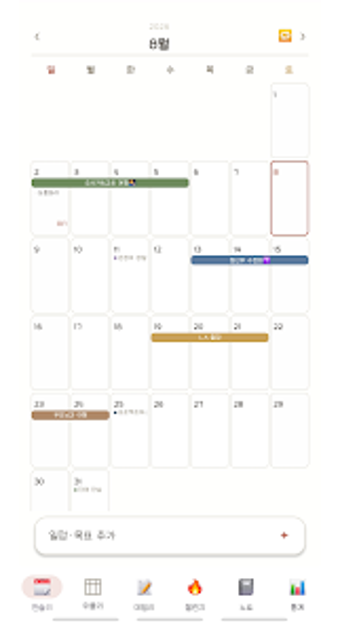
DayWiz places Monthly Planner, Weekly Timetable, Daily Dashboard, Challenge habit tracker and Notes into one interface for day-to-day planning and project tracking. Developed by mintbro for Android, the app combines paper-like textures and handwritten-style fonts with automation. Key elements include drag-and-drop multi-day events, an AI that suggests daily goals, and a stamp-card habit visual. It fits students, professionals, and hobbyists who prefer a warm, tactile planning experience and want fewer separate apps.It merges diary, tasks, habits, and notes into one work-focused tool
DayWiz acts as a single workspace that groups calendar planning, habit challenges, and free-form notes so you stop juggling separate apps. The Monthly Planner supports drag-and-drop multi-day event creation and automated Monthly Routines, while the Project tracker stages tasks into steps. That combination targets professionals who manage recurring commitments alongside longer projects, since calendar actions and project stages live inside the same workflow.
The daily workflow centers on a side-by-side dashboard with AI suggestions
The Daily Dashboard shows goals and notes in parallel and includes a built-in focus timer plus an AI that suggests daily goals when users are unsure. That design keeps a working day visible: goals, timed focus, and quick notes appear together. The app’s Challenge mode uses a stamp-card visual for habit sequences like 21- or 30-day runs, which gives habit tracking a clear visual progression.
The interface prioritizes an analog aesthetic, which shapes onboarding
DayWiz uses paper textures and handwritten-style fonts to create a warm, journal-like atmosphere. Templates include grid, lined, or blank paper styles for notes, and nested folders organize entries. Those choices reduce the clinical look of many planners, but the tactile styling and multiple modules mean some users may need a short orientation to find recurring routines and project stages.
Sync, widgets, and device-level protection support team and personal use
The app offers home screen widgets for Monthly, Weekly, Daily, Challenge, and Notes sections so updates happen without opening the app. Automatic synchronization across devices is available in the premium version via Google or Apple accounts, and data protection options include PIN, Face ID, or Touch ID locks plus manual backup and restore to files, which preserves portability for business workflows.
DayWiz suits planners who want warmth and integrated workflows
DayWiz suits professionals and students who prefer an analog look and need a unified planner that combines calendar, habit tracking, and notes. Synchronization requires the premium version, so use it where device sync is essential. For those who value a cozy interface and visual habit momentum over a stark corporate layout, the app delivers a compact, work-ready planning environment.